

By Joe Jaccarino, Founder & Principal, Revenue Cycle Insight Lab
The audit is finished. Several answers landed in “Watch.” A few landed in “Investigate.” The team recognizes the problems. What happens next?
That is where the assessment needs to become an operating decision.
The RCIL Revenue Leak Quick Audit uses 12 questions to surface friction across front-end revenue integrity, claim production and downstream performance. Completing it takes approximately 10–15 minutes. Validating the findings and improving the workflow takes additional work.
Use the audit to decide where to look. Then use evidence to decide what to change.
1. Complete the audit with people who know the work
Include someone who owns the outcome and someone who handles the exceptions. A leader may see a clean claim percentage. A biller may know how many repairs happen before the claim reaches the point that percentage measures.
For each answer, ask: “What would we show someone to support this?” Useful evidence might include claim-edit logs, unbilled inventory, rejection reports, denial records, workflow observations or documented escalation paths.
When the team disagrees, capture the disagreement. Different answers may reflect variation by payer, location, service or workflow. That difference gives you another place to investigate.
If nobody can support an answer, record the visibility gap. An assumption that a process works is weaker evidence than a recent example of how it works.
2. Read the pattern behind the total
The audit scores each question as Green (0), Watch (1) or Investigate (2). Its total-score bands are 0–6, 7–13 and 14–24, respectively. These are directional categories within the RCIL framework. They are not validated industry benchmarks, percentiles or estimates of lost revenue.
A low total can still contain a significant individual risk. Review every question scored 2 and look for clusters of related answers.
For example, recurring registration corrections, repeated claim edits and front-end denials may share an upstream cause. Treating each queue independently could leave that cause untouched.
Separate confirmed findings from questions that still need evidence. “Staff describe repeated manual corrections” is a useful signal. It does not yet tell you the frequency, cause or financial impact.
3. Match the finding to the next investigation
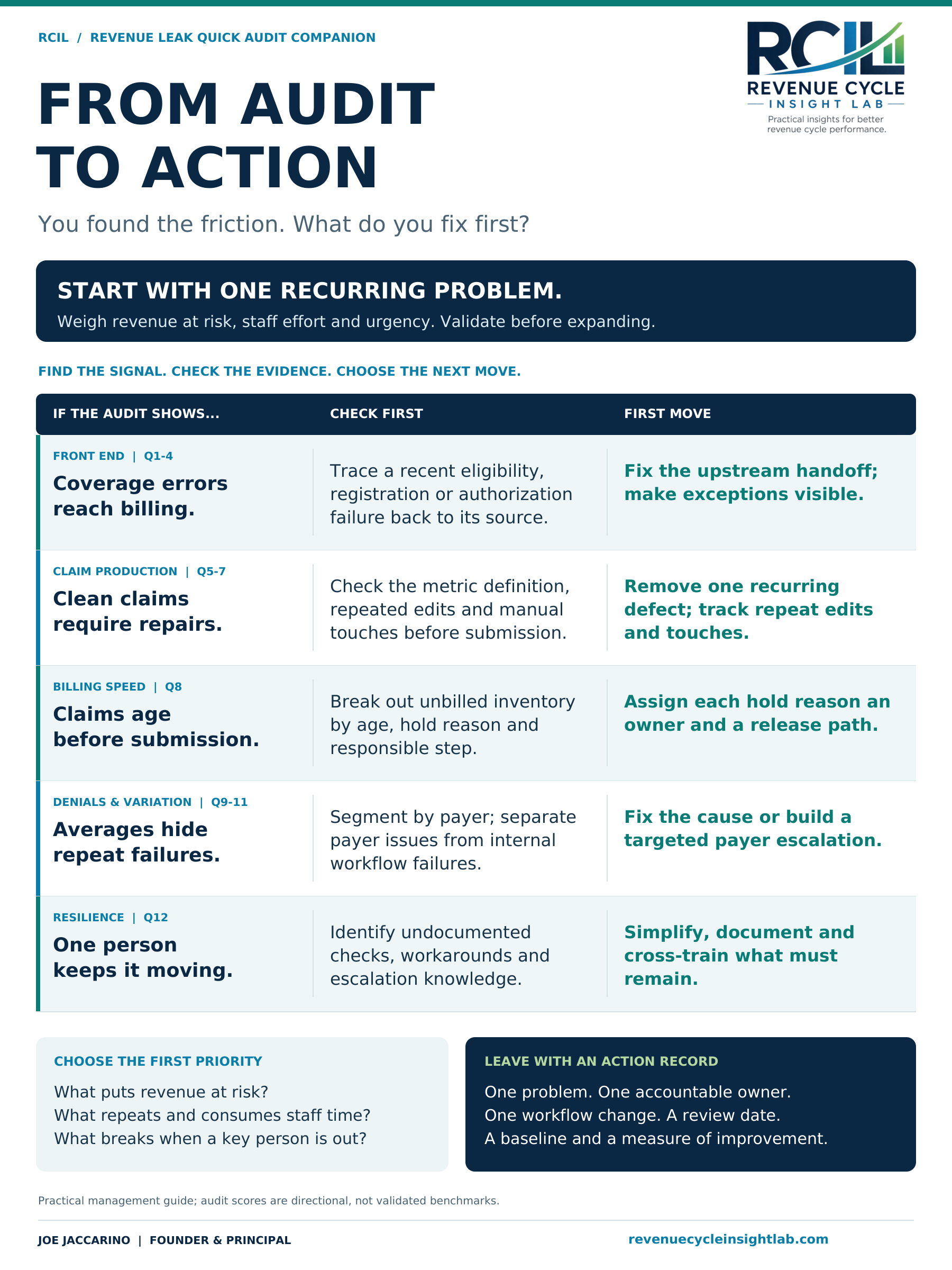
Download the one-page Audit to Action chart (PDF).
The companion chart groups the 12 questions into five practical action areas. The original audit has three sections; this view reorganizes them to help choose a next step.
| Audit signal | Check first | First move |
|---|---|---|
| Coverage errors reach billing (Q1–4) | Trace a recent eligibility, registration or authorization failure to its source. | Fix the upstream handoff and make exceptions visible. |
| Clean claims require repairs (Q5–7) | Review the metric definition, repeated edits and manual touches before submission. | Remove one recurring defect and track repeat edits and touches. |
| Claims age before submission (Q8) | Break out unbilled inventory by age, hold reason and responsible step. | Assign each hold reason an owner and a release path. |
| Averages hide repeat failures (Q9–11) | Segment by payer or service; distinguish payer behavior from internal failures. | Correct the internal cause or build a targeted payer escalation. |
| One person keeps the process moving (Q12) | Identify undocumented checks, workarounds and escalation knowledge. | Simplify the workflow, then document and cross-train what must remain. |
4. Choose one problem the team can define
Start by weighing revenue exposure, recurring staff effort and urgency. Consider how often the issue occurs, what happens if it continues and how confidently you understand it. A filing deadline or material compliance concern may require immediate escalation even when another issue affects more claims.
Avoid a first initiative as broad as “improve denials.” A more useful starting point is: “Determine why authorization-related denials recur for this payer and service, then correct the failed handoff.” That gives the team a process to inspect and an outcome to verify.
You may need immediate containment while you investigate. Clearing an aged queue can protect near-term revenue. Pair that work with a change that prevents the same queue from rebuilding.
5. Establish a baseline before changing the workflow
Choose a recent period and a clearly defined population. Record the data source, inclusion rules and any exclusions. Keep those definitions consistent when you review the result.
For a recurring claim edit, useful measures might include affected claims, repeated edits, manual touches and time from service to submission. If you sample staff handling time, label it as a sample and document how it was collected.
Avoid assigning every held or denied dollar to permanent revenue loss. Some balances may still be collectible. Distinguish delayed cash, potential loss and additional operating effort; quantify each only when the evidence supports it.
Use existing system data where it answers the question. A brief observation exercise can fill a gap without creating a permanent manual reporting burden.
6. Turn the finding into an action record
An owner needs enough specificity to act. Record the problem, supporting evidence, baseline, proposed change, accountable owner, contributors and review date. Include a measure that would reveal whether the change creates another problem.
Here is an illustrative example, not a client result:
| Field | Example |
|---|---|
| Finding | Billing staff repeatedly correct the same registration field before submission. |
| Evidence to validate | Trace affected claims to the registration source and observe how the field is captured. |
| Proposed change | After confirming the cause, correct the capture step or applicable validation rule and define an exception path. |
| Accountable owner | Registration lead, with billing and system support. |
| Baseline and measure | Track the share of in-scope claims requiring that correction, plus manual touches. |
| Guardrail | Watch time to bill and rejection rates so fewer edits do not simply mean errors pass downstream. |
| Review | Set the date before launch; compare equivalent populations and extend observation if volume is too low. |
The owner coordinates the change across teams. The person fixing the claim today may have little control over the step that creates the error.
7. Check whether the work actually changed
At the review date, ask whether the defect occurs less often, whether manual effort fell and whether quality and billing speed held up. Look for work that moved to a different queue, team or spreadsheet.
A better number needs an explanation. Did the workflow improve? Did volume or payer mix change? Did the team alter the metric definition? A small pilot can show whether a change is promising, but it may need a longer observation period before you can judge sustained results or downstream collections.
Bring the evidence back to the team and decide whether to keep, adjust or expand the change. Then choose the next recurring problem.
Start with one finding
Complete the audit, identify the answer that deserves a closer look and leave the discussion with an owner, a baseline and a review date. That is a concrete first step toward reducing the work behind the KPI.
Download the free RCIL Revenue Leak Quick Audit.
For related perspectives, read A 95% Clean Claim Rate Can Still Hide a Broken Revenue Cycle and When Revenue Cycle Performance Depends on Heroics.
The audit and companion chart are practical management tools. Interpret findings in the context of your organization, payer mix, service lines, technology and staffing model.

